

The problem nobody is talking about yet
Picture this. A customer finds your website. They want to book an appointment, ask for a quote, or buy something. Instead of doing it themselves, they ask their AI assistant to handle it.
The agent opens your site. And then it starts guessing.
It clicks the wrong field. It picks the wrong service. It gets stuck on step 3 of your checkout. The customer watches it fail, closes the tab, and goes somewhere else.
This is not a future problem. AI assistants like Gemini in Chrome are already helping people browse, fill forms, and get things done online. Most websites were not built for this. They were built for humans who could read a page, figure out what to do, and complete the task themselves.
That is changing. And Google has done something about it.
The good news is that most small businesses do not need to rush into WebMCP implementation today. But they should pay attention to what it signals about the future of websites, customer journeys, and AI-assisted browsing.
At Google I/O 2026, Google announced WebMCP. It is still early. Most businesses do not need to act on it today. But if you own a website, run an online store, or manage any kind of digital presence, you need to understand what it is telling you.
What Is WebMCP?
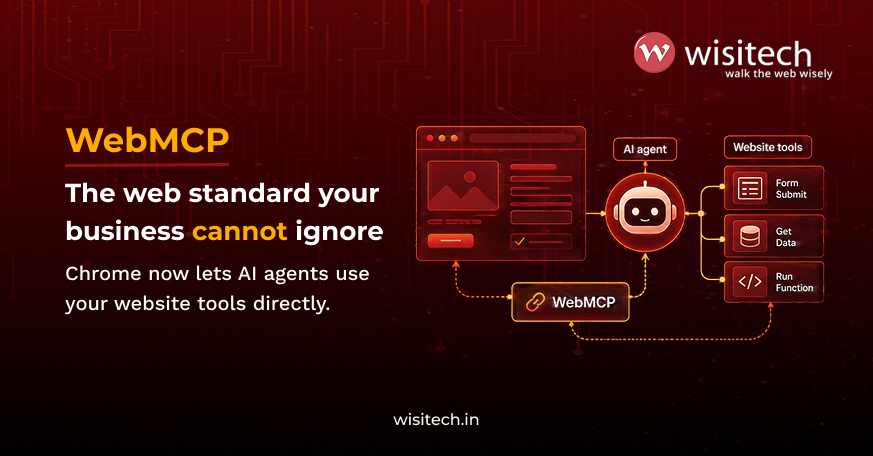
WebMCP stands for Web Model Context Protocol. Think of it as a way for your website to speak directly to AI agents.
Right now, when an AI agent tries to use a website, it has to figure things out on its own. It looks at the page, guesses what each button does, tries to fill in fields, and hopes for the best. It is a bit like asking someone to complete a task in a language they barely speak.
WebMCP changes that. It lets you define specific actions on your website, such as “book an appointment,” “search for a product,” or “submit an inquiry.” When an AI agent visits, it does not have to guess anymore. Your site tells it exactly what to do and how to do it.
The result is a more reliable and predictable way for AI agents and websites to work together. When implemented well, it can reduce friction in booking, inquiry, checkout, and other customer journeys while helping users complete tasks more efficiently.
Google proposed WebMCP in May 2026. The origin trial (the phase where developers can start testing it) is available from Chrome 149 onwards. Google has stated that Gemini in Chrome is being developed to support WebMCP capabilities as the standard evolves. As the standard continues to develop, the details may change, so developers should verify the latest Chrome documentation before beginning implementation.
Why this matters for small businesses and startups
Here is the bit most tech articles skip over.
WebMCP is not just a new feature for developers. It signals a broader shift in how people may interact with websites in the future. AI assistants are gradually moving beyond answering questions and towards helping users complete tasks such as researching services, comparing options, submitting inquiries, and making bookings.
If your website handles that well, you win the customer. If it does not, the agent either fails or moves on.
The businesses most likely to struggle are ones that have:
- Checkout flows that are long, confusing, or full of unexpected steps.
- Forms with vague labels where it is not clear what information is needed.
- Service pages that do not explain what you offer, who it is for, or what happens next.
- Contact details buried deep in the site.
- No clear path for a visitor to follow from arriving to converting.
None of these are new problems. WebMCP simply makes them more visible, because an AI assistant encountering a confusing journey is more likely to struggle to complete the task successfully. The impact of those issues becomes easier to see for both businesses and users.
A website that works well for a human visitor, a search engine, and an AI agent is no longer three separate goals. It is one.
Many of the improvements that help AI agents also support traditional SEO. Clear page structure, semantic HTML, schema markup, logical navigation, and well-organized content make it easier for search engines and AI systems alike to understand your website. This is not a coincidence. Both search engines and AI agents are trying to read and interpret the same thing: your website.
The better structured a website is, the easier it becomes for both search engines and AI systems to understand it. In practice, businesses that invest in custom SEO services focused on site architecture, schema implementation, and content structure often find they are already addressing many of the same foundations that support AI-assisted browsing.
Which businesses need to pay attention first?
Not every business will feel the impact of AI-assisted browsing at the same pace. The businesses most likely to be affected early are those that rely on structured customer journeys, forms, bookings, inquiries, or online transactions.
Ecommerce and D2C brands
Product discovery, cart management, checkout flows, and product variants need to be easy for both users and AI assistants to navigate.
SaaS and B2B technology
Pricing pages, demo requests, free trial signups, and lead-generation forms should have clear paths to conversion.
Healthcare and clinics
Appointment booking, patient inquiries, and service requests benefit from simple, structured workflows.
Education and coaching
Course applications, eligibility checks, consultation bookings, and admissions inquiries are all task-based journeys that may increasingly involve AI assistance.
Professional services
Service pages, consultation requests, and lead-generation forms should clearly explain next steps and reduce unnecessary friction.
Travel and hospitality
Booking journeys, availability searches, and reservation processes need to be simple and easy to complete.
Financial services
Applications, comparisons, and support requests often involve detailed information, making clear structure especially important.
Support-heavy businesses
Ticket submissions, callback requests, and customer support forms benefit from consistent and well-defined workflows.
What WebMCP does NOT mean
Let’s clear up a few things, because the early coverage of WebMCP has created some misunderstandings.
- It does not mean every small business needs to implement WebMCP right now
The standard is still in origin trial from Chrome 149. It will evolve. Most businesses should focus on website fundamentals first and revisit WebMCP implementation when it reaches broader availability. - It does not replace SEO, UX, or CRO. WebMCP sits on top of a website, not underneath it. A site with poor content, weak structure, and ineffective forms will still struggle to perform, regardless of whether WebMCP tools are implemented. In practice, many businesses see greater results from improving user journeys and conversion paths through website redesign services before considering early WebMCP adoption.
- It does not guarantee conversions
Giving an AI agent a clean tool to complete your checkout does not guarantee customers will buy. The offer, the price, the trust signals, and the content still determine that. - It does not let AI agents do whatever they want
WebMCP tools only expose what you explicitly define. An agent cannot access any part of your site that you have not given it permission to interact with. Users remain in control and must confirm sensitive actions.
WebMCP is still evolving, and its long-term adoption path remains uncertain. Features available during the current origin trial may change as the standard develops and receives broader industry feedback. For most businesses, the sensible approach is to monitor progress and focus on website fundamentals rather than rushing into early implementation.

What you should do right now
You do not need to implement anything new. What you do need is an honest look at your website.
Here is a simple checklist:
- Walk through your own website as a new visitor would
Spend 10 minutes trying to complete your most important conversion action from scratch. Make note of anything that slows you down, any instruction that is unclear, any form field where you are not sure what to type. That list is your starting point. - Decide what you want your website to actually do for your business
Not everything, just the 3 or 4 actions that bring in leads or sales. A quote request, a product purchase, a demo booking, a phone call. Then check whether there is a clear and direct path to each one from your homepage. If someone has to search for the button, they will not bother. - Shorten your forms
Long forms with optional fields mixed in with required ones, no progress bar, and vague labels lose people. The shorter and clearer the better. That applies to human visitors and AI agents alike. - Clean up your HTML and add schema markup
Structured HTML and schema markup help search engines and other systems interpret your website more accurately. These improvements are already considered best practices for website organization and search visibility, and many technical SEO services include them as part of a broader optimization strategy. - Answer the 4 basic questions on every page
What do you offer? Who is it for? What does it cost (or how does pricing work)? What happens after someone gets in touch?
If a visitor cannot answer all 4 in 30 seconds, the page needs work. - Set up proper tracking
If you are not tracking form completions, WhatsApp clicks, calls, and checkout drop-offs, you cannot measure anything. Fix this before anything else. - Sort the journeys before thinking about WebMCP
A confusing checkout is still a confusing checkout, with or without WebMCP tools on top.
AI assistants are already helping people browse, book, and buy online. At Wisitech, we audit your website structure, user journeys, forms, and technical setup to close the gaps before they cost you leads.
Request a Free Website Audit | Book a Free Consultation
How WebMCP actually works
For those who want a bit more detail. No code knowledge needed. Google has proposed 2 ways for websites to talk to AI agents.
- Declarative API
You add a few extra labels to your existing HTML forms. These labels tell the browser what the form is for and what each field means. The AI agent reads those labels and fills the form in correctly. It is a relatively low-effort change if your forms are already well structured. - Imperative API
This one uses JavaScript and handles more complex scenarios. Think multi-step checkouts, live availability searches, or a booking system where the available options change based on what the user has already selected. It is more powerful than the Declarative approach. It also takes significantly more development work to set up properly.
Both work through the browser while your page is open. The moment the user closes the tab, the agent loses access. There is no background access. Everything happens in front of the user, and they can see every step the agent takes.
Google has also explained how WebMCP relates to MCP (Model Context Protocol), a separate standard for connecting AI agents to backend systems like databases and apps. They are not the same thing. MCP runs in the background between systems. WebMCP works in the browser on a live page. They are designed to work alongside each other.
What we see in website audits
In website audits at Wisitech, the most common issues we find are not technical limitations. They are friction points in the user journey. Long forms, unclear calls-to-action, missing schema markup, confusing navigation, multi-step checkouts, and service pages that do not clearly explain what happens next are all common problems. These are the same issues that affect conversion rates today and will also affect AI-assisted browsing.
The challenge is rarely the technology itself. It is usually the customer journey. Whether someone is requesting a quote, booking an appointment, starting a free trial, completing a checkout, or submitting a support request, unnecessary friction makes success less likely. The same issues that frustrate human visitors today can also make it harder for AI assistants to complete tasks accurately on behalf of users.
Improving the user experience matters far more than implementing new technology for its own sake. Clearer forms, stronger page structure, better calls-to-action, and simpler conversion paths help visitors complete tasks more easily while making websites easier for search engines and future AI agents to understand.
The businesses most prepared for AI-assisted browsing are often the ones that have already invested in UX, CRO, website architecture, and conversion-focused design. In many cases, strengthening these fundamentals delivers greater value than early adoption of emerging standards. WebMCP may become an important layer in the future, but long-term success will still depend on having a website that is clear, intuitive, and easy to use.
What This means for your business in plain terms
Rather than a list of technical benefits, here is what it actually changes day to day.
- Customer expectations
This does not change just because an AI agent is involved. If an agent helps someone submit a form, request a quote, or complete a booking, the experience still reflects on your business. A smooth journey builds confidence. A confusing one creates friction, regardless of whether the interaction started with a person or an AI assistant. - Fewer abandoned forms and carts
If an agent fills in a form correctly the first time, you get a complete, usable submission. Not a half-finished one you cannot follow up on. - Faster bookings and inquiries
A user who says “book me an appointment with this clinic for Thursday morning” and gets a confirmed booking in a few seconds is far more likely to show up than one who had to battle a confusing form. - Cleaner support tickets
A support form that an agent helps complete with all the right information means your team spends less time asking follow-up questions and more time solving the actual problem. - A website that adapts well as browsing habits evolve
As AI assistants become a more common part of how people research, compare, and complete tasks online, websites with clear structure and intuitive user journeys are likely to be better positioned. Complex or confusing experiences, on the other hand, may create additional friction for both users and AI-assisted interactions.
Wisitech’s view on all of this
We have been following WebMCP since Google announced on February 10, 2026, as an early preview in Chrome Canary.
Our view is straightforward. WebMCP is not primarily a developer story. It is a website quality story. The businesses that will do well with AI-assisted browsing are the ones whose websites are already clear, fast, well structured, and easy to use.
Many of the challenges businesses face today have little to do with WebMCP itself. A confusing booking process, unnecessary checkout steps, or a lack of clear guidance creates friction regardless of who is trying to complete the task. Improving those journeys is often far more important than adding new technology.
Fix the journey. Build the structure. Get the tracking in place. Whether that means custom website development built around your specific business goals or targeted improvements to what you already have, the starting point is the same: make it work properly for a human visitor first. That is what makes a website ready for AI agents. WebMCP, when the time comes, will be much easier to add on top of a site that already works well.
The Bottom Line
The origin trial for WebMCP is live. The standard is real and actively being developed. But for most businesses, the immediate job is not implementation. It is getting your website to a standard where implementation would actually work.
Clear forms. Simple checkout flows. Logical page structure. Good schema markup. Proper tracking. A website that a person can use without confusion is also a website that an AI agent can use without confusion.
That is where your energy should go right now.
The way people browse and buy is changing. AI assistants are already part of that shift. At Wisitech, we audit website structure, user journeys, forms, technical SEO, and tracking to help businesses close the gaps before they cost leads or sales.
Request a Free Website Audit | Book a Free Consultation
Official Sources
- WebMCP: Get Started
- WebMCP vs MCP: When to Use Each
- WebMCP Declarative API
- WebMCP Imperative API
- WebMCP Tool Security
- WebMCP Best Practices
- Agent Security Considerations for WebMCP
- Chrome at Google I/O 2026
This article draws on official Google Chrome developer documentation, Google I/O 2026 announcements, and Wisitech’s analysis of how emerging web technologies may affect website strategy, user experience, and conversion performance. Because WebMCP is still evolving, businesses and developers should review the latest guidance and implementation updates before making development decisions.